Watch
Video credit: How AI Image Generators Make Bias Worse – posted by LIS – The London Interdisciplinary School on YouTube
Think
Explore
Attackers use many different methods to obtain personal information so as to steal a victim’s identity. Two popular methods are ‘pharming’ and ‘phishing’. Both methods trick the user into believing the attacker is someone – or something – they’re not. Falling victim to either form attack could cause an individual to lose control of their identity.
Phishing
Phishing is when the hacker poses as a trustworthy source and asks the victim to give out personal information, or follow a link to an unsafe website. Often phishing scams messages or emails appear to be from legitimate companies. Phishing can take several forms:
- Phishing Emails: Scammers might send you an email from a domain or email address that is similar to a real, trustworthy person or company, but is spelled slightly differently. Sometimes these emails might contain telltale poor grammar and spelling mistakes, but other times (particularly as AI makes it easier to write convincing professional emails), they can be very convincing.
- Smishing: Smishing is like phishing, except over SMS or text messages. Smishing messages might alter the sender ID of a text message to make it appear as though it was sent by a trusted phone number or business.
- Voice Cloning: Using AI, it is possible for scammers to convincingly imitate other peoples’ voices. This means that scammers could send you voice messages that sound like they come from a trusted family member, friend or coworker.
To protect yourself against phishing:
- If you think an email or message is suspicious, ask the sender to confirm whether the message was real using another means of communication.
- Practice identifying suspicious messages, by looking through some examples of phishing emails and messages from the Canadian Anti-Fraud Centre, here. You can also read about recent frauds and scams involving AI on the AI Incident Database.
- Be especially wary of links sent to you by email or text message. These links could lead to websites that look legitimate but are run by scammers who collect your data to commit fraud.
- If you do want to follow a link sent to you by email or text, first verify the sender’s address and check that the linked website begins with “https://”.
- To protect yourself from phishing attempts involving voice cloning, come up with a password or special phrase with your family, to identify yourselves in case of emergency.
Pharming
Pharming is a method of identity fraud that takes over a legitimate website or server in order to scam innocent people out of their money. A hacker changes the settings of a server so that when you enter the address of a legitimate website, it redirects you to a fake or a copy of the original site hosted somewhere else. Any data entered on this fake site is then stored on the server of this hacker. The diagram below details how a typical pharming set-up might work. Click on the image to see a larger version, then use your browser’s back button to return to this page.
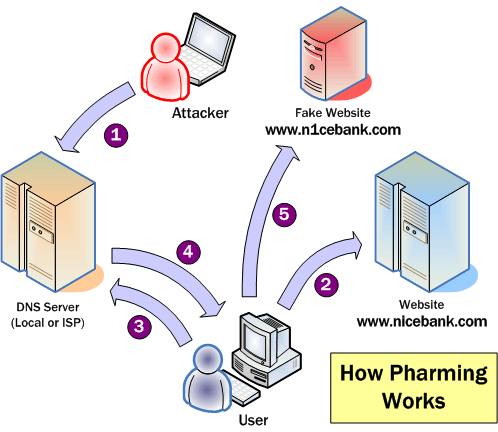
Image from palisade.plynt.com
There are many ways people can try to steal your identity online and offline. Pharming is mostly targeted at companies’ websites and not individual users. While legitimate companies try to prevent this by installing defensive software and monitoring their web traffic, there are some things you can do to help protect yourself against pharming.
- Always check that the website has security certificates and that the web address starts with https://
- Read our online tutorial on Wi-fi hotspot security.
- Check your bank and credit card statements regularly and report any suspicious charges.
Links
- Canadian Anti-Fraud Centre
- Mobile pharming – same attacks – different seeds | CSO (2016)
- What is Pharming and how can you prevent this Online Fraud? | The Windows Club (2017)
- What Is Pharming and How Can It Be Prevented? | MakeTechEasier (2017)
- What’s Pharming and How Can You Avoid It? | TechNadu (2018)
- What is Pharming & How to Prevent It? | Kaspersky
- Phishing | Canadian Anti-Fraud Centre
- AI Incident Database: AI Frauds and Scams | AI Incident Database (2026)
- Phishing | Canadian Anti-Fraud Centre (2026)
- Help! I need money. Its an emergency. Your childs voicemail that could be a scam | The Guardian (2025)
Discuss
The Digital Tattoo Project encourages critical discussion on topics surrounding digital citizenship and online identity. There are no correct answers and every person will view these topics from a different perspective. Be sure to complete the previous sections before answering the questions.
- Have you ever experienced a phishing or pharming attack? What did you do?
- What steps can you take to minimize your risk of falling victim to phishing or pharming?
What do you think? Tell us using the comment below.